
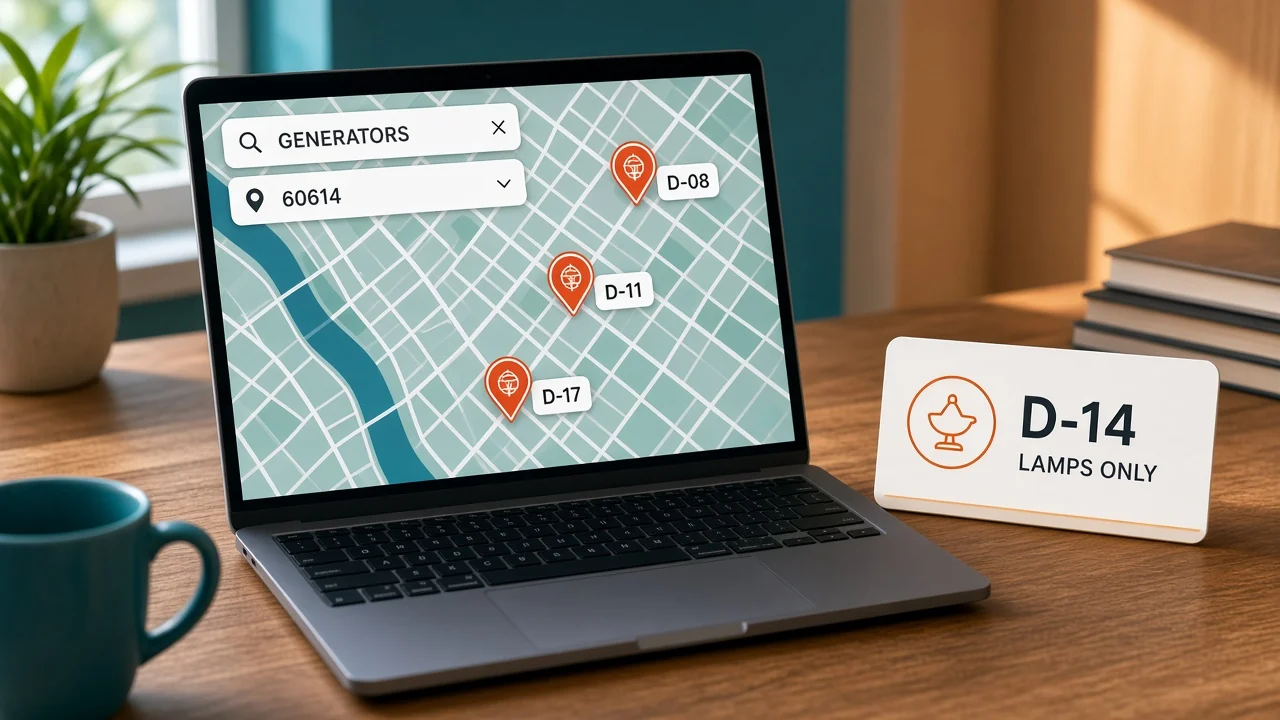
A shopper near zip 60614 searched for the generator. Dealer D-14 was never authorized for GEN-200. The pin still appeared, first, because it was close. Where to buy dealer locator work is the list of who may sell the product, not the map tile under the pin.
Distance is the second sort. Authorization is the first filter.
What should a where to buy dealer locator show?
It shows dealers you currently authorize for the product the shopper asked about, nearest first, with the address you have on file. It does not show every company that once bought from you. A pin without a product filter is a phone book.
Google's local business structured data docs say that when people search for businesses, results may show a knowledge panel, and that this markup can tell Google about hours, departments, and reviews your site actually captures. Mark up the dealer you mean, with that dealer's name and address. Do not mark your brand headquarters as if it were D-14's store.
The FTC's advertising FAQ says advertisers must have proof for express and implied claims. "Authorized dealer" is a claim. If D-14 is not authorized for generators, the generator search cannot call them one.
What is on the dealer row?
Twelve dealers are in this example file. One row is enough to see the rule. The zip and the lines are examples, not a live network.
| Column | Dealer D-14 |
|---|---|
| Name | The legal name on the agreement |
| Address | A street you can mail, in 60614 |
| Status | Active |
| Authorized lines | Lamps |
| Not authorized | GEN-200 and the rest of the power line |
| Phone | The counter number, not a rep's mobile from 2019 |
A closed dealer stays in the file with status inactive. Deleting the row makes you forget why they disappeared, and a later import from an old sheet puts them back. Inactive must be excluded from the map.
Hours belong here only if the dealer gave them to you. Do not copy a chain's hours onto an independent counter. A wrong close time is a wasted trip the shopper will blame on the brand.
Which dealer should the zip return?
The shopper typed 60614 and selected generators. Filter to dealers whose authorized lines include GEN-200 and whose status is active. Then sort by distance.
If D-14 is the closest door and they only sell lamps, they do not appear. A farther dealer who is authorized does.
An empty result is the right result when nobody authorized sits inside the radius. Do not fill the map with unauthorized pins so the page looks busy. Empty is honest. A wrong pin sends someone across town for a product that store cannot sell.
Write the radius on the page. In this example it is 25 miles. A shopper who needed a dealer 40 miles away should see that the search stopped, not that the brand has no dealers at all.
Show the line names in the shopper's words if you can. "Power" on your contract might mean generators to you and extension cords to them. The filter label should match the product they searched.
Dealer locator pages in OneChannelAdmin are supposed to follow that authorized list. A pretty map that ignores the list is the bug, not the design.
What should you not put on the pin?
Do not invent a star rating. Google's docs talk about reviews your site captures, not scores you made up so a dealer looks busier. A fake 4.8 is a claim you cannot back.
Stock on the pin is a different mistake. Show a quantity only when that dealer gave you a number you trust. Your warehouse having 34 units is not D-14's shelf. A shopper sent to a store with zero lamps got a wrong pin, even when that dealer is authorized for lamps.
Agreements end on a date, and the pin should end that same day. Status goes inactive when the agreement ends, not after the next quarterly cleanup. The shopper does not know your quarter.
Phone numbers go stale quietly. Call the twelve example dealers once before launch, an example check, not an industry standard. Any number that rings the wrong business comes off the pin that day.
How do you publish one product line?
- Load the dealer file with name, mailing address, status, and authorized lines. D-14 is active for lamps only.
- Mark inactive dealers and exclude them from the public map.
- Search zip 60614 for generators. D-14 must not appear.
- Search the same zip for lamps. D-14 may appear if the address geocodes and the status is active.
- Remove any star rating you cannot tie to a review you actually collected.
- Turn off stock badges unless the quantity came from that dealer.

Save both searches. The lamp result proves the dealer is not deleted. The generator result proves the filter works. You need both screenshots, or a later argument will be "the locator is broken" when it is doing the job.
Product records should use the same line names as the dealer file. If the catalog says "portable power" and the dealer file says "GEN-200," the filter will look empty even when an authorized dealer exists.
Account catalogs are the dealer ordering side. The public locator is the shopper side. Do not publish the dealer's contract price on the pin.
Your own on-hand count can drive your direct site. It should not be pasted onto a dealer's pin as if they held the stock.
How do you stop an old sheet from restoring a pin?
Someone will always have last year's dealer export. If that file is imported on top of the live list, D-14 can come back authorized for generators because the old row said "all lines." The import has to match on a dealer id and update fields you name. It should not add a pin just because a row exists.
Give each dealer a stable id, D-14 in this example, and refuse rows with a blank id. A second "D-14 Lamps" created by a nickname will show up as a duplicate pin a block apart. Shoppers then call the wrong door.
Before you publish, diff the new file against the live file. New dealers, dropped dealers, and line changes should be a short list a person reads.
Twelve dealers make that list small enough to read out loud. A 2,000-row file needs the same diff. You just do not read every address. You read every line that changed.
Geocoding fails quietly. If 60614 lands in the wrong city, the nearest sort is nonsense. Open the pin on a map once when you add the dealer, and again if the address changes. Do not trust a green "imported" message.
Keep the previous file for a week, an example window. If Friday's import hides every generator dealer, you can roll back without retyping twelve agreements. After that week, the live list is the one that matters, and the spreadsheet in email is not a source.
A shopper complaint is a test, not an anecdote. Ask for the zip, the product, and the dealer they saw. Then run that search yourself.
If D-14 appears for generators, the filter regressed. If they appear for lamps, the locator did what you asked and the complaint is about authorization, which is a contract question.
Questions about the map
Why did the closest dealer disappear?
They are hidden when the product is outside their authorized lines. D-14 can be nearest to 60614 and still be absent on a generator search. Try the lamp search if you need to confirm the pin itself works.
Can you show every dealer and let the shopper ask?
That puts an unauthorized seller in front of a shopper who believes the brand sent them. If they are not authorized for that line, leave them off that search.
Should the pin say the item is in stock?
Only with a quantity from that dealer. Units in your warehouse are not units on their floor. A stock badge without their count is a guess.
Do you delete dealers who leave?
Set them inactive and keep the row. Inactive dealers stay off the map. Deleting them makes an old spreadsheet able to recreate the pin on the next import.
Can you add a rating to sort the list?
Only if the rating is from reviews you actually have. An invented score is a claim. Sort by distance after the authorization filter instead.
OneChannelAdmin Team writes about authorized dealer lists and the shopper searches that have to obey them.
Looking for the product? See Where-to-Buy & Dealer Locator software.
Run inventory, orders, and marketplaces in one place
See how OneChannelAdmin connects catalog, warehouse, and multichannel selling without spreadsheet chaos.