
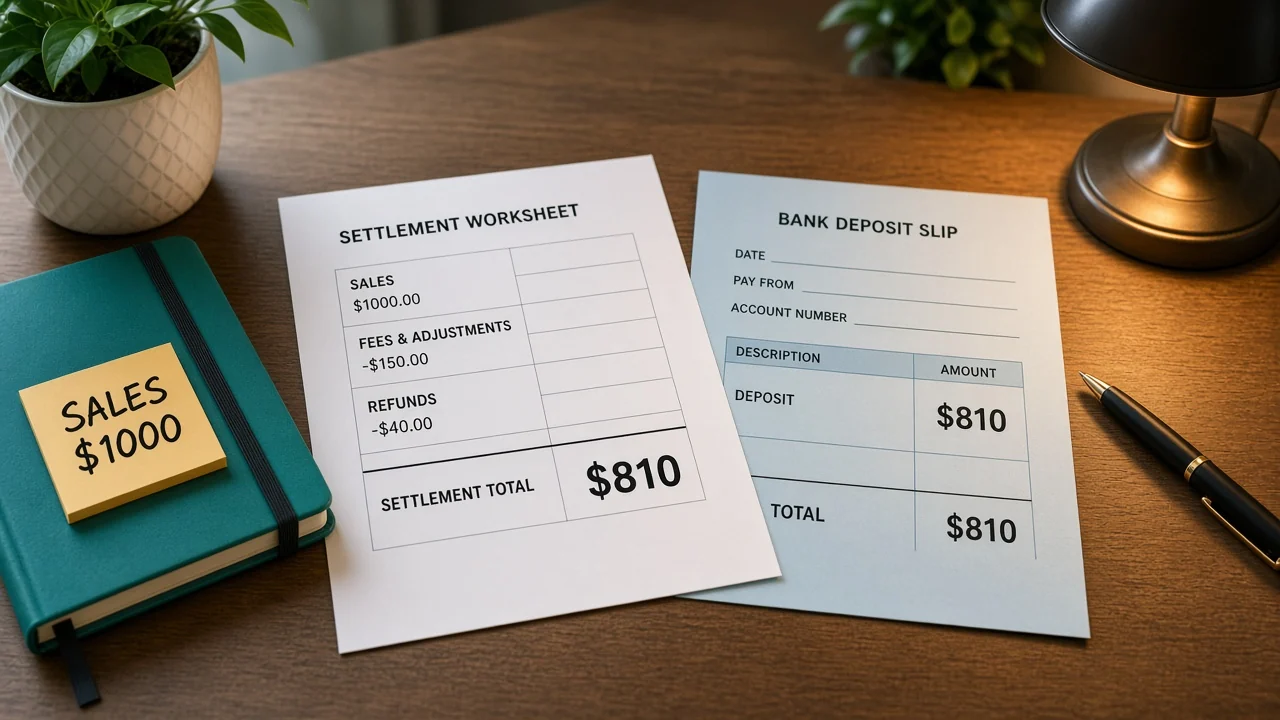
The bank shows $810. The sales export shows $1,000. Someone is about to book the deposit as the sales. How to reconcile Amazon payouts starts from the settlement total, then explains the gap with the lines inside that same settlement.
This is a bookkeeping walkthrough with example dollars. It is not tax advice.
How to reconcile Amazon payouts?
Match the bank deposit to the settlement's total amount. Then explain the difference between sales and that total with the fees and refunds in the same file. In this example the total is $810. The $1,000 is product sales inside the file, not the money that hit the bank.
Amazon's settlement report docs say the Flat File V2 report replaces the older flat file and the XML settlement report. Price columns are condensed into amount-type, amount-description, and amount. The file also carries settlement-id, deposit-date, and total-amount.
Amazon's changelog says the older XML settlement report and the older flat file settlement report are removed on November 11, 2026. Reconcile from the V2 file. A spreadsheet built on the old columns will go quiet on that date and the deposits will keep arriving.
What is in the example settlement?
These dollars are made up so the tie-out is visible. They are not Amazon's fee schedule.
| Line | Example amount |
|---|---|
| Product sales | $1,000 |
| Fees | $150 |
| Refund | $40 |
| Settlement total | $810 |
| Bank deposit on the deposit date | $810 |
Check the arithmetic before you touch the books. 1000 minus 150 minus 40 is 810. If your file's total-amount is not that figure, you missed a line. Do not "plug" the difference to a miscellaneous account to force the deposit.
Group the amount column by amount-type. Fees are not one bucket forever. A referral fee and a fulfillment fee can both be fees and still belong in different expense accounts. The description column tells you which.
One order can appear as several rows: the sale, the fee, a refund a week later. Sum the settlement. Do not sum a single order and call that the payout.
Where do the lines go in the books?
Use a clearing account that is only for this marketplace. Post the settlement lines there. Then post the bank deposit as the movement from clearing to the bank.
When the total matches, clearing for that settlement returns to where it started. If it started at zero, it ends at zero.
For this example, the shape is: credit sales $1,000, debit fees $150, debit refunds $40, debit the bank $810. Debits are 1,000. Credits are 1,000. The bank entry is $810, not $1,000.
Booking a single $810 deposit straight to sales hides the $150 and the $40. Sales are understated. Fees never show up. Next month the margin looks better than the business was.
Leave the settlement-id on the deposit memo. When a second $810 arrives, you will know which file it belongs to. Two settlements can share an amount. They should not share a memo.
Amazon integration can bring the orders in. The payout tie-out is still this file against the bank. An order import does not replace total-amount.
What if the bank shows $800?
Do not edit the settlement to match the bank. An $800 deposit against an $810 total means $10 is somewhere else: a different settlement-id, a reserve that has not released, or a bank fee your bank took after Amazon sent the money. Find the $10. A forced match teaches the next close to ignore gaps.
Read deposit-date, not the day you noticed the money. A Friday deposit that posts in the bank on Monday still belongs to the settlement's deposit date in your memo, and to the day the cash actually cleared when you reconcile the bank statement. Write both dates if they differ, so you are not hunting a "missing" Friday deposit on Monday's screen.
Posted date on a row is when that amount joined the settlement. An order from last month can refund inside this file. Pulling "this month's orders" from the order report will not equal this payout. The payout equals the rows in the settlement.
What gets the tie-out off by one order?
People reconcile the order date. Amazon pays by the posted amounts in the settlement period. A $40 refund on an older order reduces this deposit even though the sale is in last month's books.
That reduction is correct. Enter the refund in this settlement. Do not delete last month's sale.
Skipping deferred amounts is the other miss. Money that is not released yet is not in this total. If you add those orders into the $1,000 because they "already shipped," your expected deposit will be higher than total-amount. Wait until the row is in a settlement, then tie that settlement.
Currency format matters on non-US files. Amazon notes that amounts can use local formats. A European file may show a comma where you expect a decimal.
Parse the file the way the doc describes before you add the column. A bad parse can turn one amount into two.
Order records still matter for which SKU sold. They are the operations side. The settlement is the cash side. You need both, and you do not add them together.
How do you tie one deposit?
- Download the Flat File V2 settlement for the period, not the older flat file.
- Read settlement-id, deposit-date, and total-amount. In this example the total is $810.
- Sum product sales, fees, and refunds. Confirm 1000 minus 150 minus 40 equals 810.
- Post those lines to the marketplace clearing account, with the settlement-id on the memo.
- When the bank shows $810, move $810 from clearing to the bank. Clearing for this id should be back to its start.
- If the bank shows a different number, stop. Find the missing amount before you post a plug.

Keep the file. A month later a refund question will ask which settlement took the $40. The order screen will not answer that by itself.
Inventory should already have moved for the units in the $1,000. The payout does not decrement the shelf again. If you reduce stock when cash arrives, you will double-count the shipment.
Multichannel orders from other marketplaces need their own clearing accounts. Do not drop a second channel's deposit into Amazon's clearing and hope the $810 still ties.
Which columns do you keep from the file?
Save settlement-id, deposit-date, total-amount, posted-date, order-id, sku, amount-type, amount-description, and amount. You can hide the rest while you learn the file. Do not delete rows just to make the sheet look prettier on a laptop screen. A hidden fee is how the $810 stops tying.
Sort by amount-type first. In the example, product sales sum to $1,000, fees sum to $150, and the refund is $40. If a new description shows up next month, it still lands in the amount column. Add it into the right bucket instead of ignoring an unfamiliar label.
Write the bank amount next to total-amount on a one-line cover note: settlement-id, deposit-date, file total $810, bank $810, difference $0. When the difference is not zero, the note says the gap and where you looked. A blank note that just says "reconciled" is not something you can defend later.
Store the untouched download beside the workbook. If a formula breaks, you still have the source. Renaming columns in the only copy of the file is how you lose amount-description the week a new fee appears.
One marketplace, one folder, one cover note per settlement-id. Mixing two marketplaces in a single sheet makes an $810 match look true when half of it came from somewhere else.
Questions about the deposit
Should you book the $810 as sales?
Book sales from the sales lines, $1,000 in this example. The $810 is the deposit after fees and the refund. Putting the deposit into sales hides both the fee and the refund, and it understates revenue.
Which file replaces the old settlement report?
Amazon's Flat File V2 settlement report is the one to use. The older XML report and the older flat file are removed on November 11, 2026. Read amount-type, amount-description, and amount.
What if two deposits are both $810?
The settlement-id distinguishes them. Put that id on the bank memo. Matching on amount alone will tie the wrong period the next time the total repeats.
Do you include orders that have not been released?
Released rows in this settlement are the ones that make up total-amount. An order that is still deferred is not part of this $810. Add it when it lands in a later file.
Can you copy these journal amounts?
No. The $1,000, $150, $40, and $810 are an example so the clearing account is easy to see. Use the totals from your own file. This walkthrough is not tax advice.
OneChannelAdmin Team writes about marketplace cash, orders, and the stock those orders already moved.
Run inventory, orders, and marketplaces in one place
See how OneChannelAdmin connects catalog, warehouse, and multichannel selling without spreadsheet chaos.